Redux ソースコード徹底解説(長文注意)
目次
Reduxのソースコードは非常に洗練されており、わずか数百行のコードで強力な機能を提供しています。今日は、その詳細を探ってみましょう。
ソースコードを見る最も簡単な方法は、エントリファイルから見ていくことです。どのモジュールに依存しているかを確認し、その後、それらのモジュールの内容を順番に見ていくと、最終的にコード全体を明確に理解できるようになります。
それでは、エントリファイルから見ていきましょう。
import applyMiddleware from "./applyMiddleware";
import bindActionCreators from "./bindActionCreators";
import combineReducers from "./combineReducers";
import compose from "./compose";
import createStore from "./createStore";
import warning from "./utils/warning";

/*
 * This is a dummy function to check if the function name has been altered by minification.
 * If the function has been minified and NODE_ENV !== 'production', warn the user.
 */
function isCrushed() {}
// 就是根据 isCrushed 是否被压缩了,来警告开发者正在非生产环境使用一个压缩过的代码。
if (
  process.env.NODE_ENV !== "production" &&
  typeof isCrushed.name === "string" &&
  isCrushed.name !== "isCrushed"
) {
  warning(
    "You are currently using minified code outside of NODE_ENV === 'production'. " +
      "This means that you are running a slower development build of Redux. " +
      "You can use looseenvify (https://github.com/zertosh/looseenvify) for browserify " +
      "or DefinePlugin for webpack (http://stackoverflow.com/questions/30030031) " +
      "to ensure you have the correct code for your production build.",
  );
}

export {
  createStore,
  combineReducers,
  bindActionCreators,
  applyMiddleware,
  compose,
};
以下のモジュールに依存していることがわかります。
- createStore
- combineReducers
- bindActionCreators
- applyMiddleware
- compose
- warning
他に特筆すべきことはなく、いくつかのAPIを公開しているだけです。それでは、このモジュールの依存関係の順序に従って、順に解説していきましょう。
createStore
まず、createStoreです。これはアプリケーション全体のstoreを作成するために使われます。 その依存モジュールは、すべてユーティリティ関数です。
- isPlainObject
export default function createStore(reducer, preloadedState, enhancer) {
  if (typeof preloadedState === 'function' && typeof enhancer === 'undefined') {
    enhancer = preloadedState
    preloadedState = undefined
  }

  if (typeof enhancer !== 'undefined') {
    if (typeof enhancer !== 'function') {
      throw new Error('Expected the enhancer to be a function.')
    }
    return enhancer(createStore)(reducer, preloadedState)
  }

  if (typeof reducer !== 'function') {
    throw new Error('Expected the reducer to be a function.')
  }
ここでのロジックは非常にシンプルです。
最初の if 文は、2つの引数のみが渡され、2番目の引数 preloadedState が関数の場合、2番目の引数を enhancer と見なすという意味です。
2番目の if 文は、enhancer が関数であることを保証し、enhancer が引数として渡された場合、enhancer(createStore)(reducer, preloadedState) を createStore の戻り値、つまり私たちが求める store として返します。
3番目の if 文は、reducer が関数であることを保証します。
次に進みましょう。
let currentReducer = reducer;
let currentState = preloadedState;
let currentListeners = [];
let nextListeners = currentListeners;
let isDispatching = false;

function ensureCanMutateNextListeners() {
  if (nextListeners === currentListeners) {
    nextListeners = currentListeners.slice();
  }
}

/**
 * Reads the state tree managed by the store.
 *
 * @returns {any} The current state tree of your application.
 */
function getState() {
  return currentState;
}ここでは、preloadedState を currentState に代入することで、アプリケーションが特定の状態を直接再現できるようになります。また、サーバーサイドレンダリング時にバックエンドで計算されたものをアプリケーションの初期状態として使用することもできます。
ensureCanMutateNextListeners 関数は、nextListeners === currentListeners が成立する場合に、currentListeners のコピーを nextListeners に代入します。何のために使われるのかはまだはっきりしませんが、とりあえず置いておきましょう。
そして、現在のstateを取得するメソッドを定義しています。
subscribe
次に、subscribe メソッドです。
/**
 * Adds a change listener. It will be called any time an action is dispatched,
 * and some part of the state tree may potentially have changed. You may then
 * call `getState()` to read the current state tree inside the callback.
 *
 * You may call `dispatch()` from a change listener, with the following
 * caveats:
 *
 * 1. The subscriptions are snapshotted just before every `dispatch()` call.
 * If you subscribe or unsubscribe while the listeners are being invoked, this
 * will not have any effect on the `dispatch()` that is currently in progress.
 * However, the next `dispatch()` call, whether nested or not, will use a more
 * recent snapshot of the subscription list.
 *
 * 2. The listener should not expect to see all state changes, as the state
 * might have been updated multiple times during a nested `dispatch()` before
 * the listener is called. It is, however, guaranteed that all subscribers
 * registered before the `dispatch()` started will be called with the latest
 * state by the time it exits.
 *
 * @param {Function} listener A callback to be invoked on every dispatch.
 * @returns {Function} A function to remove this change listener.
 */
function subscribe(listener) {
  if (typeof listener !== "function") {
    throw new Error("Expected listener to be a function.");
  }

  let isSubscribed = true;

  ensureCanMutateNextListeners();
  nextListeners.push(listener);

  return function unsubscribe() {
    if (!isSubscribed) {
      return;
    }

    isSubscribed = false;

    ensureCanMutateNextListeners();
    const index = nextListeners.indexOf(listener);
    nextListeners.splice(index, 1);
  };
}コメントが非常に明確に説明しています。listener 監視関数を登録し、それを現在の監視リスト nextListener に追加します。そして、この監視関数を登録解除するための unsubscribe メソッドを返します。
dispatch
function dispatch(action) {
  if (!isPlainObject(action)) {
    throw new Error(
      "Actions must be plain objects. " +
        "Use custom middleware for async actions.",
    );
  }

  if (typeof action.type === "undefined") {
    throw new Error(
      'Actions may not have an undefined "type" property. ' +
        "Have you misspelled a constant?",
    );
  }

  if (isDispatching) {
    throw new Error("Reducers may not dispatch actions.");
  }

  try {
    isDispatching = true;
    currentState = currentReducer(currentState, action);
  } finally {
    isDispatching = false;
  }

  const listeners = (currentListeners = nextListeners);
  for (let i = 0; i < listeners.length; i++) {
    const listener = listeners[i];
    listener();
  }

  return action;
}
現在の state を変更するために action をディスパッチします。これは state を変更する唯一の方法でもあります。動作を記述する action を引数として受け取り、その action を関数の戻り値とします。
コードの前の判断からわかるように、action はリテラルオブジェクトである必要があり、type プロパティを含んでいる必要があります。
if (isDispatching) {
  throw new Error("Reducers may not dispatch actions.");
}
ここからわかるように、もし現在が前のアクションのディスパッチ段階にある場合、現在の action はディスパッチに失敗する可能性があります。
その後、現在の state の計算が行われ、nextListeners 内の監視関数が順番にトリガーされます。
replaceReducer
/**
 * Replaces the reducer currently used by the store to calculate the state.
 *
 * You might need this if your app implements code splitting and you want to
 * load some of the reducers dynamically. You might also need this if you
 * implement a hot reloading mechanism for Redux.
 *
 * @param {Function} nextReducer The reducer for the store to use instead.
 * @returns {void}
 */
function replaceReducer(nextReducer) {
  if (typeof nextReducer !== "function") {
    throw new Error("Expected the nextReducer to be a function.");
  }

  currentReducer = nextReducer;
  dispatch({ type: ActionTypes.INIT });
}
現在の reducer を置き換え、初期化のための内部 action をディスパッチします。
export const ActionTypes = {
  INIT: "@@redux/INIT",
};
observable
/**
 * Interoperability point for observable/reactive libraries.
 * @returns {observable} A minimal observable of state changes.
 * For more information, see the observable proposal:
 * https://github.com/tc39/proposalobservable
 */
function observable() {
  const outerSubscribe = subscribe;
  return {
    /**
     * The minimal observable subscription method.
     * @param {Object} observer Any object that can be used as an observer.
     * The observer object should have a `next` method.
     * @returns {subscription} An object with an `unsubscribe` method that can
     * be used to unsubscribe the observable from the store, and prevent further
     * emission of values from the observable.
     */
    subscribe(observer) {
      if (typeof observer !== "object") {
        throw new TypeError("Expected the observer to be an object.");
      }

      function observeState() {
        if (observer.next) {
          observer.next(getState());
        }
      }

      observeState();
      const unsubscribe = outerSubscribe(observeState);
      return { unsubscribe };
    },

    [$observable]() {
      return this;
    },
  };
}
オブジェクトを observable にするためのメソッドで、通常は使用されません。
最後
// When a store is created, an "INIT" action is dispatched so that every
// reducer returns their initial state. This effectively populates
// the initial state tree.
dispatch({ type: ActionTypes.INIT });

return {
  dispatch,
  subscribe,
  getState,
  replaceReducer,
  [$observable]: observable,
};
INIT 初期化 action をディスパッチし、すべての reducer がデフォルトの初期 state を返すようにします。
そして、上記の関数を createStore によって作成された store のAPIとして返します。
combineReducers
このモジュールは複数の reducer を1つの reducer に結合するために使用されます。その依存モジュールは以下の通りです。
- ActionTypes
- isPlainObject
- warning
combineReducers の内容を順に見ていきましょう。
getUndefinedStateErrorMessage
function getUndefinedStateErrorMessage(key, action) {
  const actionType = action && action.type;
  const actionName =
    (actionType && `"${actionType.toString()}"`) || "an action";

  return (
    `Given action ${actionName}, reducer "${key}" returned undefined. ` +
    `To ignore an action, you must explicitly return the previous state. ` +
    `If you want this reducer to hold no value, you can return null instead of undefined.`
  );
}
reducer が undefined を返した場合のエラーメッセージを生成するための関数を定義しています。特に説明することはありません。
getUnexpectedStateShapeWarningMessage
function getUnexpectedStateShapeWarningMessage(
  inputState,
  reducers,
  action,
  unexpectedKeyCache,
) {
  const reducerKeys = Object.keys(reducers);
  const argumentName =
    action && action.type === ActionTypes.INIT
      ? "preloadedState argument passed to createStore"
      : "previous state received by the reducer";

  if (reducerKeys.length === 0) {
    return (
      "Store does not have a valid reducer. Make sure the argument passed " +
      "to combineReducers is an object whose values are reducers."
    );
  }

  if (!isPlainObject(inputState)) {
    return (
      `The ${argumentName} has unexpected type of "` +
      {}.toString.call(inputState).match(/\s([az|AZ]+)/)[1] +
      `". Expected argument to be an object with the following ` +
      `keys: "${reducerKeys.join('", "')}"`
    );
  }

  const unexpectedKeys = Object.keys(inputState).filter(
    (key) => !reducers.hasOwnProperty(key) && !unexpectedKeyCache[key],
  );

  unexpectedKeys.forEach((key) => {
    unexpectedKeyCache[key] = true;
  });

  if (unexpectedKeys.length > 0) {
    return (
      `Unexpected ${unexpectedKeys.length > 1 ? "keys" : "key"} ` +
      `"${unexpectedKeys.join('", "')}" found in ${argumentName}. ` +
      `Expected to find one of the known reducer keys instead: ` +
      `"${reducerKeys.join('", "')}". Unexpected keys will be ignored.`
    );
  }
}
関数名「予期しないState構造の警告メッセージを取得する」からわかるように、この関数は渡された inputState の構造が誤っている場合にエラーメッセージを生成するために使用されます。
Reducer には key が必要であり(これは当然のことですが)、inputState はリテラルオブジェクトである必要があります。また、inputState の key はすべて reducer の自身のプロパティ(OwnProperty、プロトタイプチェーン上ではない)に含まれている必要があり、渡された unexpectedKeyCache に含まれていてはなりません。
assertReducerShape
function assertReducerShape(reducers) {
  Object.keys(reducers).forEach((key) => {
    const reducer = reducers[key];
    const initialState = reducer(undefined, { type: ActionTypes.INIT });

    if (typeof initialState === "undefined") {
      throw new Error(
        `Reducer "${key}" returned undefined during initialization. ` +
          `If the state passed to the reducer is undefined, you must ` +
          `explicitly return the initial state. The initial state may ` +
          `not be undefined. If you don't want to set a value for this reducer, ` +
          `you can use null instead of undefined.`,
      );
    }

    const type =
      "@@redux/PROBE_UNKNOWN_ACTION_" +
      Math.random().toString(36).substring(7).split("").join(".");
    if (typeof reducer(undefined, { type }) === "undefined") {
      throw new Error(
        `Reducer "${key}" returned undefined when probed with a random type. ` +
          `Don't try to handle ${ActionTypes.INIT} or other actions in "redux/*" ` +
          `namespace. They are considered private. Instead, you must return the ` +
          `current state for any unknown actions, unless it is undefined, ` +
          `in which case you must return the initial state, regardless of the ` +
          `action type. The initial state may not be undefined, but can be null.`,
      );
    }
  });
}
渡された reducers の構造が正しいことを保証するために使用されます。つまり、各 reducer は INIT action を受け取った後、undefined ではない initState を返す必要があり、この action は reducer 内で特別に処理されてはなりません。これが、reducer 内でデフォルトの state を必ず指定する必要がある理由です。
combineReducers
/**
 * Turns an object whose values are different reducer functions, into a single
 * reducer function. It will call every child reducer, and gather their results
 * into a single state object, whose keys correspond to the keys of the passed
 * reducer functions.
 *
 * @param {Object} reducers An object whose values correspond to different
 * reducer functions that need to be combined into one. One handy way to obtain
 * it is to use ES6 `import * as reducers` syntax. The reducers may never return
 * undefined for any action. Instead, they should return their initial state
 * if the state passed to them was undefined, and the current state for any
 * unrecognized action.
 *
 * @returns {Function} A reducer function that invokes every reducer inside the
 * passed object, and builds a state object with the same shape.
 */
export default function combineReducers(reducers) {
  const reducerKeys = Object.keys(reducers);
  const finalReducers = {};
  for (let i = 0; i < reducerKeys.length; i++) {
    const key = reducerKeys[i];

    if (process.env.NODE_ENV !== "production") {
      if (typeof reducers[key] === "undefined") {
        warning(`No reducer provided for key "${key}"`);
      }
    }

    if (typeof reducers[key] === "function") {
      finalReducers[key] = reducers[key];
    }
  }
  const finalReducerKeys = Object.keys(finalReducers);

  let unexpectedKeyCache;
  if (process.env.NODE_ENV !== "production") {
    unexpectedKeyCache = {};
  }

  let shapeAssertionError;
  try {
    assertReducerShape(finalReducers);
  } catch (e) {
    shapeAssertionError = e;
  }

  return function combination(state = {}, action) {
    if (shapeAssertionError) {
      throw shapeAssertionError;
    }

    if (process.env.NODE_ENV !== "production") {
      const warningMessage = getUnexpectedStateShapeWarningMessage(
        state,
        finalReducers,
        action,
        unexpectedKeyCache,
      );
      if (warningMessage) {
        warning(warningMessage);
      }
    }

    let hasChanged = false;
    const nextState = {};
    for (let i = 0; i < finalReducerKeys.length; i++) {
      const key = finalReducerKeys[i];
      const reducer = finalReducers[key];
      const previousStateForKey = state[key];
      const nextStateForKey = reducer(previousStateForKey, action);
      if (typeof nextStateForKey === "undefined") {
        const errorMessage = getUndefinedStateErrorMessage(key, action);
        throw new Error(errorMessage);
      }
      nextState[key] = nextStateForKey;
      hasChanged = hasChanged || nextStateForKey !== previousStateForKey;
    }
    return hasChanged ? nextState : state;
  };
}
combineReducer は、1つの reducer に結合するためのオブジェクトを受け取り、実行後に1つの関数、つまり私たちの rootReducer を返します。
まず、渡された reducers を key ごとに走査して finalReducers に代入します。その後、一連のエラーチェックを行い、最後に combination という関数を返します。これが結合された reducer です。
let hasChanged = false
const nextState = {}
// 遍历 finalReducerKeys
for (let i = 0; i < finalReducerKeys.length; i++) {
// 拿到当前的 reducer key
    const key = finalReducerKeys[i]
// 根据 reducer key 拿到具体的 reducer 函数
      const reducer = finalReducers[key]
// 获取之前的 key 对应的 state
      const previousStateForKey = state[key]
// 计算下一个当前 key 对应的 state
      const nextStateForKey = reducer(previousStateForKey, action)
// 如果计算出来的 state 为 undefined 那么报错
      if (typeof nextStateForKey === 'undefined') {
        const errorMessage = getUndefinedStateErrorMessage(key, action)
        throw new Error(errorMessage)
      }
// 把当前 key 对应的 state 赋值到下一个全局 state
      nextState[key] = nextStateForKey
// 只要有一个 key 对应的 state 发生了变化,那么就认为整个 state 发生了变化
      hasChanged = hasChanged || nextStateForKey !== previousStateForKey
}
// 根据 state 是否发生变化,返回下一个 state 或者上一个 state
    return hasChanged ? nextState : state
  }
bindActionCreators
この関数は非常にシンプルで、ヘルパー関数です。dispatch を actionCreator にバインドするために使用されます。これにより、バインドされた関数を直接呼び出すことで action をディスパッチできるようになり、dispatch(actionCreator(…)) のように記述する必要がなくなります。
applyMiddleware
ここは重要なポイントであり、初心者が理解しにくい部分でもあります。詳しく見ていきましょう。
import compose from "./compose";

/**
 * Creates a store enhancer that applies middleware to the dispatch method
 * of the Redux store. This is handy for a variety of tasks, such as expressing
 * asynchronous actions in a concise manner, or logging every action payload.
 *
 * See `reduxthunk` package as an example of the Redux middleware.
 *
 * Because middleware is potentially asynchronous, this should be the first
 * store enhancer in the composition chain.
 *
 * Note that each middleware will be given the `dispatch` and `getState` functions
 * as named arguments.
 *
 * @param {...Function} middlewares The middleware chain to be applied.
 * @returns {Function} A store enhancer applying the middleware.
 */
export default function applyMiddleware(...middlewares) {
  return (createStore) => (reducer, preloadedState, enhancer) => {
    const store = createStore(reducer, preloadedState, enhancer);
    let dispatch = store.dispatch;
    let chain = [];

    const middlewareAPI = {
      getState: store.getState,
      dispatch: (action) => dispatch(action),
    };
    chain = middlewares.map((middleware) => middleware(middlewareAPI));
    dispatch = compose(...chain)(store.dispatch);

    return {
      ...store,
      dispatch,
    };
  };
}コード量は非常に短く、compose モジュールに依存しています。
applyMiddleware 関数は一連のミドルウェア関数を引数として受け取り、createStore メソッドを持つクロージャ関数を返します。この関数は、reducer、preloadedState、enhancer を引数として受け取ります。 createStore 関数と合わせて見てみましょう。
export default function createStore(reducer, preloadedState, enhancer) {
  if (typeof preloadedState === 'function' && typeof enhancer === 'undefined') {
    enhancer = preloadedState
    preloadedState = undefined
  }

  if (typeof enhancer !== 'undefined') {
    if (typeof enhancer !== 'function') {
      throw new Error('Expected the enhancer to be a function.')
    }

    return enhancer(createStore)(reducer, preloadedState)
  }
このように store を作成する場合:
const store = createStore(reducer, applyMiddleware(...middleware));createStore の2番目の引数が関数なので、以下の処理に進みます。
return enhancer(createStore)(reducer, preloadedState);つまり、applyMiddleware(...middleware) の結果が createStore を引き継ぎ、実際の store は applyMiddleware 内で再度 createStore を呼び出して作成されます。このとき、渡される preloadedState と enhancer はどちらも undefined です。
// applyMiddleware
const store = createStore(reducer, preloadedState, enhancer);
話を戻して、さらに見ていきましょう。
//applyMiddleware
dispatch = compose(...chain)(store.dispatch);
ここでまず compose モジュールについて見ておく必要があります。その役割は、compose(f, g, h) > (...args) => f(g(h(...args))) という目的を達成することです。
したがって、ここでの dispatch は、store.dispatch をベースに middleware によって強化・ラップされた dispatch です。
const middlewareAPI = {
  getState: store.getState,
  dispatch: (action) => dispatch(action),
};
// 把 middlewareAPI 传入到每个中间件中
chain = middlewares.map((middleware) => middleware(middlewareAPI));
ここでの dispatch: (action) => dispatch(action) は、各ミドルウェア内の dispatch が独立しており、互いに影響を与えないことを示しています。これは、あるミドルウェアが dispatch の振る舞いを変更してしまうことを防ぐためです。そして、各ミドルウェアには getState と dispatch が引数として渡されます。
return {
  ...store,
  dispatch,
};
最後に、強化された dispatch で元の store の dispatch を上書きします。
ミドルウェア全体のコードを見ると、抽象的に感じるかもしれません。例を挙げて見ていきましょう。
errorMiddleware
export default ({ dispatch, getState }) =>
  (next) =>
  (action) => {
    const { error, payload } = action;
    if (error) {
      dispatch(showToast(payload.message || payload.toString()));
    }
    return next(action);
  };
これは私たちのエラー処理ミドルウェアです。これも高階関数であり、まず dispatch と getState を引数として受け取り、next を引数として受け取る関数を返します。dispatch と getState は、上記のコードで middlewareAPI を通じてミドルウェアに渡されます。
次に、errorMiddleware の実行後に返される、next を引数として受け取る関数を見ていきましょう。この next は、実は次に実行される middleware です。
次に、ミドルウェアの実行順序を理解する必要があります。action がミドルウェア内でどのように伝播するかをより明確に説明するために、以下の3つのミドルウェアがあると仮定しましょう。
const mid1 = () => (next) => (action) => {
  console.log("mid1 before");
  next(action);
  console.log("mid1 after");
};
const mid2 = () => (next) => (action) => {
  console.log("mid2 before");
  next(action);
  console.log("mid2 after");
};
const mid3 = () => (next) => (action) => {
  console.log("mid3 before");
  next(action);
  console.log("mid3 after");
};
applyMiddleware( mid1, mid2, mid3 ) を実行すると、以下のコードの後で
dispatch = compose(...chain)(store.dispatch);以下のようになります。
dispatch = (store.dispatch) => mid1(mid2(mid3(store.dispatch)))この中の midx はすべて middleware(middlewareAPI) が実行された後に返される結果です。したがって、mid3 の next の値は store.dispatch です。そして mid2 の next は mid3(store.dispatch) となり、同様に mid1 の next は mid2(mid3(store.dispatch)) となります。これが、middleware で next を呼び出すことで action を次の middleware に渡すことができる理由です。
action をディスパッチすると、コンソールに表示される順序は次のようになります。
mid1 before
mid2 before
mid3 before
mid3 after
mid2 after
mid1 after
その流れは次のようになります。
- mid1 の
nextメソッド呼び出し前のコードを実行 - mid2 の
nextメソッド呼び出し前のコードを実行 - mid3 の
nextメソッド呼び出し前のコードを実行 dispatchを実行してactionをディスパッチ- mid3 の
nextメソッド呼び出し後のコードを実行 - mid2 の
nextメソッド呼び出し後のコードを実行 - mid1 の
nextメソッド呼び出し後のコードを実行
図を見ると、さらに理解が深まるでしょう。
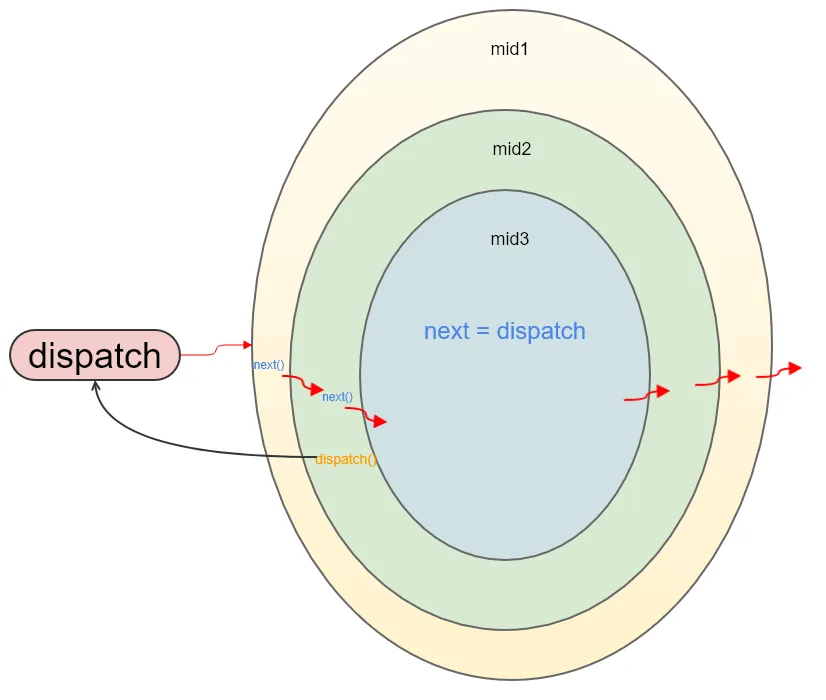
赤いパスが、私たちが先ほど説明した流れです。また、黒いパスがあるのがわかりますが、これはもし mid2 で直接 dispatch を呼び出した場合どうなるかを示しています。mid2 を変更してみましょう。
const mid2 =
  ({ dispatch, getStore }) =>
  (next) =>
  (action) => {
    console.log("mid2 before");
    dispatch(action);
    console.log("mid2 after");
  };
このように変更した場合、どうなると思いますか?
答えは、mid1 before と mid2 before の間で無限ループに陥ります。なぜなら、呼び出された dispatch は、この action をすべてのミドルウェアに再度通すことになるからです(図中の黒いパス)。したがって、ミドルウェア内で dispatch を呼び出す必要がある場合は、action に対して条件判断を行い、特定の条件を満たす場合にのみ dispatch を呼び出すことで、無限ループを避ける必要があります。mid2 を改造してみましょう。
const mid2 = ({ dispatch, getStore }) => next => action => {
  console.log('mid2 before')
  if(action.isApi) {
    dispatch({
      isApi: false,
      ...
    })
  }
  dispatch(action)
  console.log('mid2 after')
}このようにすることで、action が isApi 条件を満たす場合にのみ、isApi 条件を満たさない action をディスパッチするようになり、無限ループは発生しません。この方法は、非同期で action をディスパッチする際によく使われます。例えば、本番環境でデータリクエストに使用する callAPIMiddleware の例です。
export default ({dispatch, getState}) => {
return next => action => {
  const {
    types,
    api,
    callType,
    meta,
    body,
    shouldCallAPI
  } = action
  const state = getState()
  const callTypeList = ['get', 'post']
  if (!api) {
    return next(action)
  }
  if (!(types.start && types.success && types.failure)) {
    throw new Error('Expected types has start && success && failure keys.')
  }
  if (callTypeList.indexOf(callType) === 1) {
    throw new Error(`API callType Must be one of ${callTypeList}`)
  }

  const {start, success, failure} = types
  if (!shouldCallAPI(state)) {
    return false
  }

  dispatch({
    type: start,
    payload: {
      ...body
    },
    meta
  })
  const mapCallTypeToFetch = {
      post: () => fetch(api, {
        method: 'post',
        // credentials 设置为每次请求都带上 cookie
        credentials: 'include',
        headers: {
          'Accept': 'application/json',
          'Content-Type': 'application/json'
        },
        body: JSON.stringify(bodyWithSource)
      }),
      get: () => {
        const toString = Object.keys(bodyWithSource).map(function (key, index) {
          return encodeURIComponent(key) + '=' + encodeURIComponent(bodyWithSource[key])
        }).join('&')
        return fetch(`${api}?${toString}`, {
          method: 'get',
          credentials: 'include',
          headers: {
            'Accept': 'application/json'
          }
        })
      }
    }
    const fetching = mapCallTypeToFetch[callType]()
... 省略一堆业务逻辑
  return fetching.then(res => {
    clearTimeout(loadingTimer)
    dispatch(hideLoading())
    if (res.ok) {
      try {
        return res.json()
      } catch (err) {
        throw new Error(err)
      }
    } else {
      dispatch(showToast('请求出错'))
      return Promise.reject(res.text())
    }
  })
    .then(res => resBehaviour(res))
    .then(res => {
      dispatch({
        type: success,
        meta,
        payload: {
          ...res.data
        }
      })
      return Promise.resolve(res)
    })
    .catch(err => {
      console.error(`接口请求出错,${err}`)
      return Promise.reject(err)
    })
}
ミドルウェアについては以上です。皆さんも理解できたことと思います。
まとめ
全体的に見ると、Reduxのソースコードは非常に短いですが、その実装はどれも非常に巧妙です。
また、作者は開発者の体験を非常に重視しており、コメントが非常に詳細で、全体的に読みやすいです。エラー処理も非常に詳細で、開発者がエラーを特定しやすくなっています。
最後に、私の能力には限りがあるため、もし記事中に誤りがありましたら、ご指摘いただき、一緒に議論させていただければ幸いです。
この記事は 2017年8月18日 に公開され、2025年10月13日 に最終更新されました。384 日が経過しており、内容が古くなっている可能性があります。